STAFF QUICK LINKS
Your daily tools to manage appointments, customers, and jobs.
Staff portal · NorCal Solar RepairBack to main site
APPOINTMENTS
Schedule and manage inspections and repairs.
4Reschedule an Appointment
- Open the appointment list.
- Find the appointment.
- Click the 3 dots on the far right.
- Select Reschedule and choose the new date/time.
5Cancel an Appointment
- Open the appointment list.
- Find the appointment.
- Use the Status drop-down menu.
- Change Confirmed to Cancelled.
CUSTOMERS
Find customer records and contact information.
JOBS
Keep jobs moving through the pipeline.
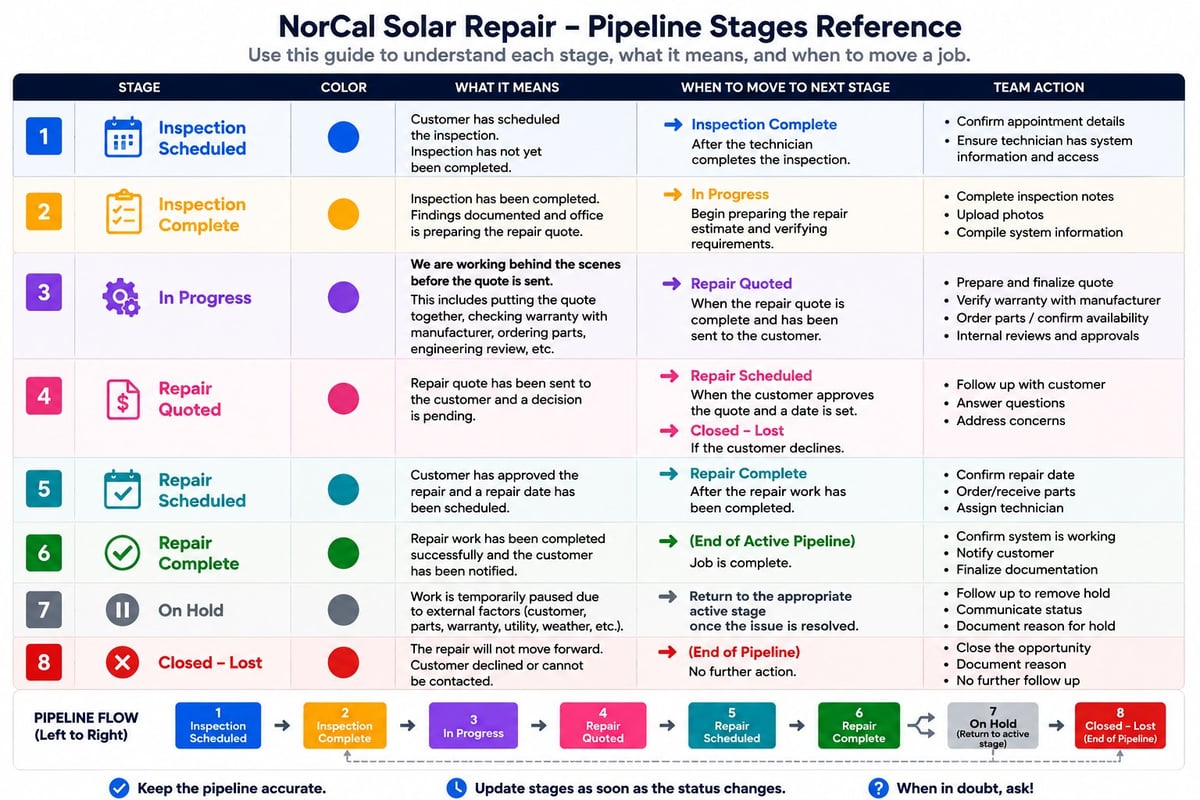
8Move Job Through Stages
Open the Solar Repair Pipeline, find the customer's job, and move it to the correct stage as work progresses.
Open Solar Repair PipelineLEADCONNECTOR APP — FINDING YOUR CALENDAR
Open the Calendar tab, pick which technicians and calendars to show, and view today's appointments from your phone.
- Open the Calendar tab. From the LeadConnector app home screen, tap the Calendar icon in the bottom navigation bar. Confirm the account name at the top says Norcal Solar Repair. Dates with a green dot have appointments. (Tip: tap "Today" to jump back.)
- Choose which technicians to view. Tap the user filter bar at the top, stay on the Users tab, check the box next to each technician you want to see (you can pick more than one), then tap Done. (Tip: use the search bar to find a name fast.)
- Choose which calendars to view. Inside Select Calendars, switch to the Calendars tab and check each calendar you want visible (e.g., Solar Inspection Calendar or Solar Repair Calendar). Tap Done. (Tip: if a calendar isn't listed, check Settings → Calendars.)
- View your scheduled appointments. Back on the Monthly View, tap any date with a green dot to see that day's appointments — client name, time window, confirmation status, and the assigned technician's initials. (Tip: tap the refresh icon if a new booking hasn't appeared yet.)
Want the full guide with screenshots? The complete PDF walks through every step with the actual LeadConnector screens.
Open the full LeadConnector guide (PDF)Pipeline Stage Guide — reference before moving a job